Broadcast (Campaigns)
Broadcast lets you send a message to many contacts at once — order reminders, promotions, holiday greetings, surveys. In Interline these are called Campaigns, and you build them from the Campaigns area in the left navigation.
This is an admin/manager activity. Front-line conversation handling lives in the Agent Guide.
The campaign list
Open Campaigns to see every campaign you've created. Each row shows the name, status (Draft or Sent), the recipient count, the channel it was sent from, and the last sent date. You can search and filter by status, channel, and date.
From a campaign's row you can preview it (the eye icon) or open its menu (⋯) to duplicate it — cloning is handy for recurring sends, since you can copy a past campaign and adjust it instead of starting over.
To start a new one, click New Campaign, give it a name, and continue into the builder.
Building a campaign
The builder is a four-step wizard: Campaign type → Audience → Content → Review. Your progress is shown down the left, and a live Preview sits on the right throughout.
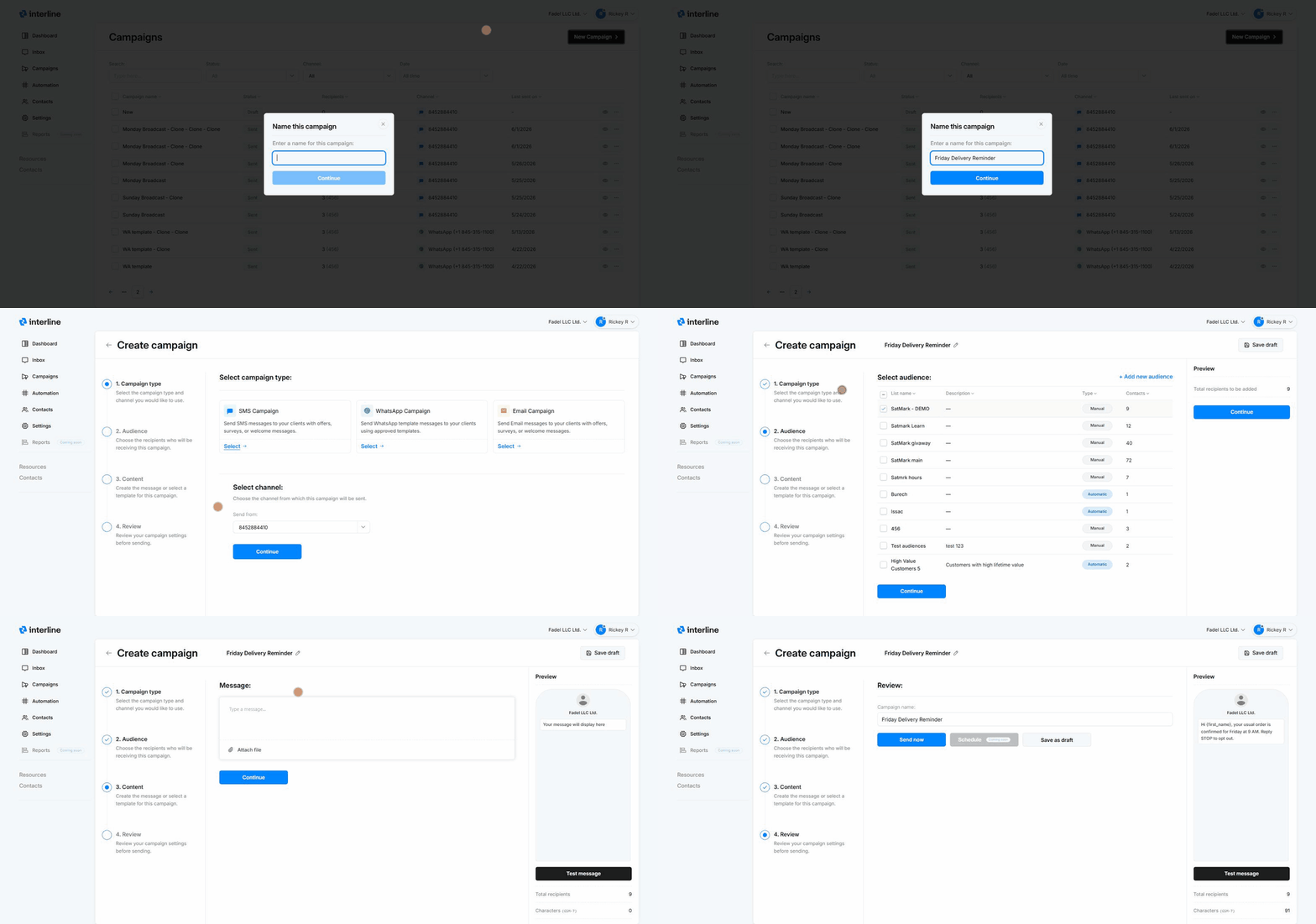
1. Campaign type & channel
Choose the type of campaign:
- SMS — text messages with offers, reminders, surveys, or welcome messages.
- WhatsApp — messages sent using your approved WhatsApp templates.
After picking a type, choose the channel/number to send from (for example which SMS number or WhatsApp number), then Continue.
Email campaigns
Broadcast campaigns currently go out over SMS and WhatsApp. Email campaigns aren't available yet. (For one-to-one email, use the Inbox.)
2. Audience
Pick who receives the campaign. You select one or more audiences (contact lists). Each audience shows its type and contact count:
- Manual audiences are fixed lists you've built by hand or by import.
- Dynamic audiences (the builder may label these Automatic) are segments that update themselves based on rules (for example High Value Customers — customers with high lifetime value).
Select as many audiences as you need; the Preview updates the total recipients as you go. You can also create a new audience on the spot with + Add new audience.
3. Content
Compose the message.
For SMS, type your message in the editor and attach a file if needed. As you type, the preview shows exactly how it will look on a phone, and the panel tracks two key numbers:
- Total recipients — how many contacts will receive it.
- Characters and encoding (e.g. GSM-7) — SMS is billed in segments, and the character count tells you how many segments your message uses. Plain GSM-7 messages fit ~160 characters per segment; longer messages or special characters use more segments (and cost more), so keep an eye on the counter.
For WhatsApp, you select one of your approved templates rather than typing free text (WhatsApp requires pre-approved templates for outbound campaigns).
Personalize with variables
Insert {variables} like {first_name} into the message and they fill in automatically for each recipient, so a one-to-many send still reads personally.
Opt-out
For SMS/WhatsApp it's good practice (and often required) to include an opt-out line such as "Reply STOP to opt out." Contacts who reply STOP are unsubscribed.
Test it first
Use Test message to send the campaign to yourself before committing, so you can confirm formatting, variables, and links look right.
4. Review & send
On the final step you can rename the campaign and then choose:
- Send now — sends the campaign immediately to the selected audiences.
- Save as draft — keeps it in the campaign list to finish or send later.
Scheduling
Sending at a future date/time (Schedule) is coming soon. For now, send immediately or save as a draft. Recurring sends can be approximated today by duplicating a past campaign when you need to send it again.
Quick recap
- Campaigns → New Campaign, name it.
- Pick SMS or WhatsApp and the sending number.
- Choose audiences (lists/segments) — watch the recipient count.
- Write the message (use {variables}, watch the segment counter, add an opt-out), and Test message to yourself.
- Review, then Send now or Save as draft.
See also: Importing Contacts to build the lists you send to, and Automation for keyword-triggered and automatic messages.