Keyword Campaigns
A keyword campaign replies automatically when a contact sends a message containing a specific word — text HOURS and get your opening times back, text SIGN ME UP and get added to a list. Keyword campaigns are a type of Automation, created and managed from the Automation area.
Where keywords live
Keyword campaigns are created under Automation → New Automation → Keyword campaign, and they appear in the Automation list alongside auto-responders and auto-assign rules, where you can pause, edit, or review them. (For the broader automation area, see Automation.)
Building a keyword campaign
After naming it, you go through a four-step wizard: Keywords → Conditions → Settings → Review.
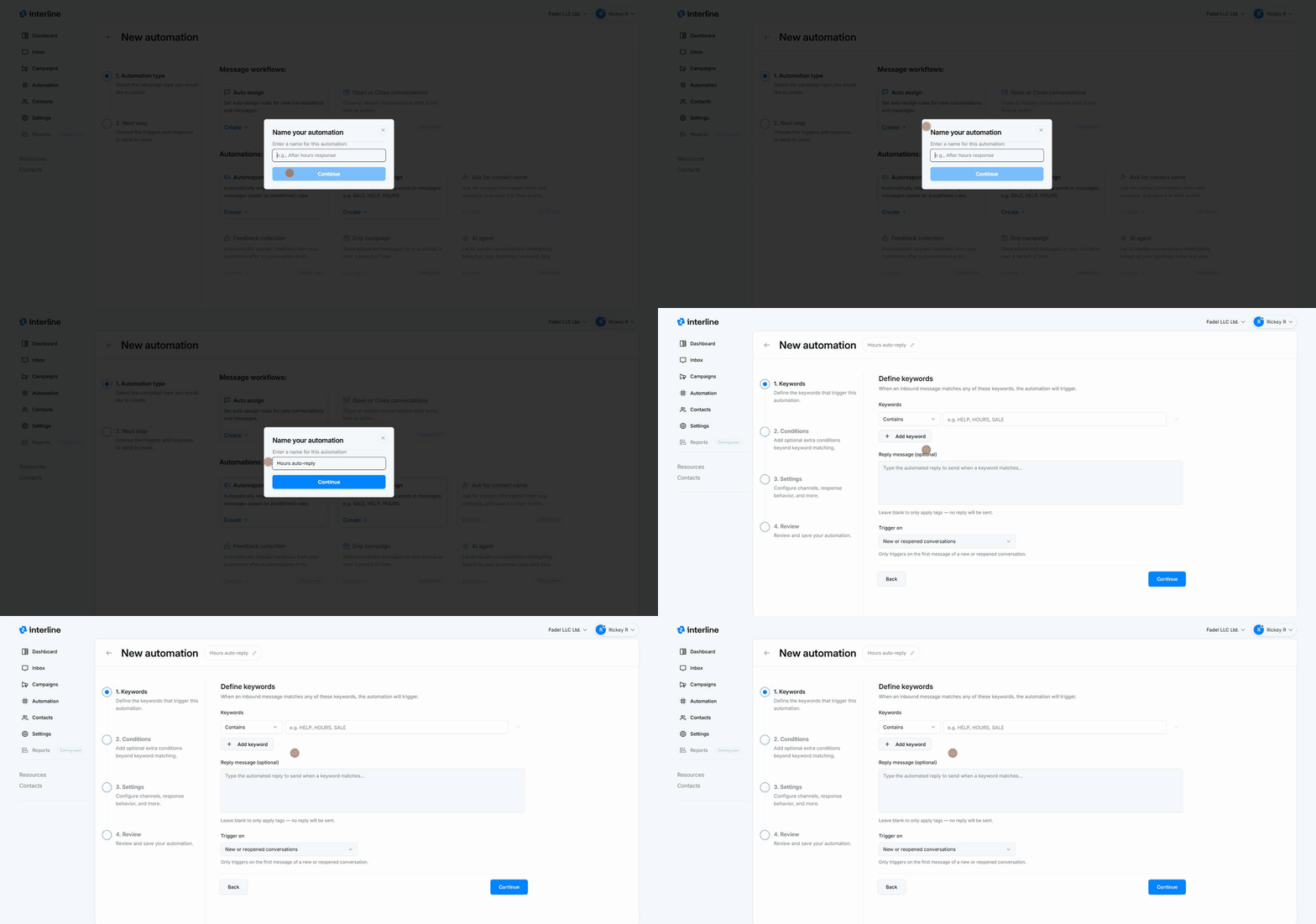
1. Keywords
Define the words that trigger the automation — when an inbound message matches any of them, the automation fires.
- Match type — how the keyword is matched (for example Contains), so you can decide whether the trigger word must be exact or just appear somewhere in the message.
- Keyword(s) — type the trigger word (e.g.
HELP,HOURS,SALE). Use + Add keyword to trigger on several words with the same response. - Reply message (optional) — the automated reply sent when a keyword matches. Leave it blank if you only want to apply tags or add the contact to a list without sending a reply.
- Trigger on — choose when it can fire: on new or reopened conversations (only the first message of a conversation) or on every message.
2. Conditions
Optionally narrow when the automation triggers beyond the keyword itself. Extra conditions are evaluated alongside the keywords using AND logic. With no conditions set, it triggers for any message matching a keyword.
3. Settings
Control the behavior and reach of the automation:
- Channels — which channels it applies to (leave empty for all channels).
- Response frequency — e.g. respond to every message, with a cooldown period (minutes before it can fire again for the same contact) to avoid spamming.
- Schedule — Anytime, only during Business hours, or a Custom schedule (specific days/times).
- Don't send if the conversation is assigned to an agent — so the automation stays out of the way once a human is handling the thread.
- Add contacts to an audience when this automation runs — this is how "text SIGN ME UP to join" works: matching contacts are added to the list you choose.
- Apply tags to contact — automatically tag contacts who trigger the keyword (useful for segmenting later).
4. Review & save
Review the configuration and save. The campaign goes live and starts responding to matching messages.
Common uses
- Info on demand —
HOURS,LOCATION,MENUreply with the relevant details. - List sign-up —
SIGN ME UP/JOINadds the contact to an audience (and optionally tags them), so they receive future campaigns. - Routing helpers — a keyword tags or flags a conversation for follow-up.
Keywords vs. auto-responders
A keyword campaign responds based on a specific word the contact sends. An auto-responder responds based on time (e.g. after-hours). Both are automations and live in the same Automation area.
One reply per match
Keyword campaigns send a single automated reply per match — they're not back-and-forth conversations. For richer flows, hand off to an agent in the Inbox.
Opt-outs
Standard opt-out words like STOP are handled by the platform's compliance/unsubscribe handling, separate from your own keyword campaigns — you don't need to build a keyword for STOP.